
Social Media Video Size Limits — Complete Comparison Table (2026)
Last updated: May 2026

Among major platforms, WhatsApp (16 MB) and Discord (20 MB free since August 2026, up from 10 MB) have the strictest video limits. The most generous is YouTube at 256 GB. WhatsApp allows just 16 MB, Gmail 25 MB, Instagram 4 GB, and TikTok ranges from 72 MB to 10 GB depending on how you upload. Below is the full comparison table for 18 platforms with exact file size caps, duration limits, best resolution, and recommended bitrate — all verified and updated for May 2026.
If you regularly share video across multiple platforms, bookmark this page — we update it every time a platform changes its limits.
Why do social media platforms limit video file size?
Video files are heavy. A single minute of 1080p footage at a standard bitrate weighs roughly 100 to 150 MB. Platforms impose limits for three core reasons: to control storage and bandwidth costs, to ensure fast loading for viewers, and to maintain a consistent playback experience across devices. When you exceed a limit, the platform will either reject your upload entirely or re-compress it aggressively, destroying quality in the process.
Understanding each platform's constraints before you export lets you choose the right resolution, bitrate, and duration from the start. That means fewer rejected uploads, better visual quality, and less wasted time re-encoding the same clip over and over.
What are the video size limits for every social media platform in 2026?
Here are the exact video upload limits for 15 major platforms as of May 2026. Discord allows 20 MB free (500 MB Nitro), WhatsApp 16 MB, Instagram 4 GB, TikTok 72–287 MB, and YouTube 256 GB.
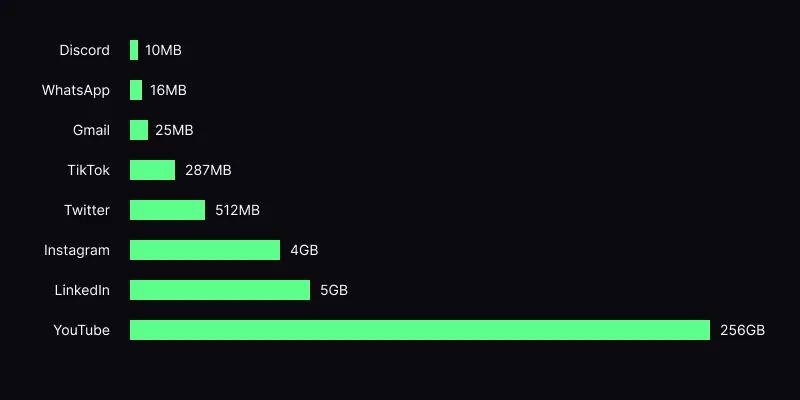
| Platform | Free Limit | Paid / Premium Limit | Max Duration | Best Resolution | Recommended Bitrate |
|---|---|---|---|---|---|
| Discord | 20 MB | 50 MB (Nitro Basic) / 500 MB (Nitro) | No limit (file size only) | 720p – 1080p | 1,500 – 5,000 kbps |
| Telegram | 2 GB | 4 GB (Premium) | No limit | 1080p | 3,000 – 6,000 kbps |
| 16 MB | 16 MB (no premium tier) | ~3 min at default quality | 720p | 800 – 1,500 kbps | |
| Email (Gmail) | 25 MB | 25 MB (attachment limit) | No limit (file size only) | 720p – 1080p | 1,000 – 3,000 kbps |
| Instagram Reels | 650 MB | 650 MB (no premium tier) | 15 min | 1080x1920 (9:16) | 3,500 – 5,000 kbps |
| Instagram Stories | 650 MB | 650 MB | 60 sec per story | 1080x1920 (9:16) | 3,500 – 5,000 kbps |
| Instagram Feed | 650 MB | 650 MB | 60 min | 1080x1350 (4:5) or 1080x1080 | 3,500 – 5,000 kbps |
| TikTok | 287 MB (mobile) / 10 GB (web) | 287 MB / 10 GB | 10 min | 1080x1920 (9:16) | 2,500 – 5,000 kbps |
| YouTube | 256 GB | 256 GB | 12 hours (verified) / 15 min (unverified) | 1080p – 4K | 8,000 – 35,000 kbps |
| 4 GB | 4 GB | 240 min | 1080p | 3,000 – 8,000 kbps | |
| Twitter / X | 512 MB | 8 GB (Premium+) | 2 min 20 sec (free) / 4 hours (Premium+) | 1080p | 2,500 – 5,000 kbps |
| 5 GB | 5 GB | 15 min (personal) / 30 min (pages) | 1080p | 3,000 – 6,000 kbps | |
| 1 GB | 1 GB | 15 min | 1080p | 2,500 – 5,000 kbps | |
| Snapchat | ~2.5 MB (Snap) / 32 MB (Story) | ~2.5 MB / 32 MB | 60 sec (Snap) / 3 min (Spotlight) | 1080x1920 (9:16) | 1,000 – 2,000 kbps |
| Slack | 1 GB | 1 GB | No limit | 1080p | 3,000 – 6,000 kbps |
| Notion | 5 MB (free) / 5 GB (paid) | 5 GB | No limit | 1080p | 2,500 – 5,000 kbps |
| Zoom | Varies by plan | Varies by plan | Meeting length | 1080p | 3,000 – 6,000 kbps |
| Microsoft Teams | 250 MB | 250 MB | No limit | 1080p | 2,500 – 5,000 kbps |
Which platforms have the strictest video limits?
Discord
Discord's free upload limit of 20 MB (doubled from 10 MB in August 2026) is still among the tightest of any major platform. At 20 MB, you can barely fit a 30-second clip at 720p without compression. Nitro Basic raises the cap to 50 MB, which is workable for clips under a minute, while full Nitro at 500 MB gives you room for multi-minute recordings. There is no duration limit; only the file size matters. The recommended format is MP4 with H.264 for inline playback. If you regularly share clips in servers, compressing to the exact tier limit is essential.
Telegram
Telegram is one of the most generous messaging platforms for video. Free users can send files up to 2 GB, and Telegram Premium doubles that to 4 GB. There is no enforced duration cap either. The platform also supports streaming playback for large files, so recipients do not have to download the entire video before watching. For best results, stick to 1080p MP4 at a moderate bitrate. The main reason to compress for Telegram is faster upload and download times rather than hitting a hard limit.
WhatsApp is notoriously restrictive. The file size cap sits at just 16 MB for video attachments, making it one of the strictest platforms alongside Discord Free. WhatsApp also applies its own compression on top of whatever you send, which can severely degrade quality. To get the best results, pre-compress your video to 720p at a low bitrate so you control the quality loss rather than leaving it to WhatsApp's aggressive re-encoding. Videos longer than about three minutes at reasonable quality simply will not fit within 16 MB.
Email (Gmail)
Gmail enforces a 25 MB attachment limit per email, which applies across all file types combined. If you are attaching anything else alongside your video, you have even less room. Files over 25 MB are automatically redirected to Google Drive as a shareable link, which adds friction for the recipient. For emailing video directly, keep clips short and compressed. A one-minute video at 720p and 2,000 kbps fits comfortably under 25 MB. Other email providers like Outlook (20 MB) and Yahoo (25 MB) have similar restrictions.
Instagram (Reels, Stories, and Feed)
Instagram gives you a 650 MB file size cap across Reels, Stories, and Feed posts, which is relatively generous. The constraints that matter more are duration and aspect ratio. Reels can run up to 15 minutes but perform best at 30 to 90 seconds. Stories are capped at 60 seconds per segment (longer videos get split automatically). Feed videos can stretch to 60 minutes. Instagram always re-encodes your upload, so providing a high-quality source at the recommended 1080x1920 resolution (9:16 for Reels and Stories) gives the algorithm more data to work with and produces a cleaner result.
TikTok
TikTok's limits differ by upload method. On mobile, the cap is 287 MB per video. On desktop or web, you can upload files up to 10 GB. Maximum video duration is 10 minutes regardless of upload method. TikTok re-encodes everything, so upload the highest quality source you can within the file size limit. The ideal format is 1080x1920 vertical video at 30 fps. Higher frame rates and 4K sources are accepted but get downscaled on playback. Keeping your bitrate between 2,500 and 5,000 kbps at 1080p strikes a good balance between quality and upload speed.
YouTube
YouTube is by far the most generous platform for video uploads. The file size limit is 256 GB and verified accounts can upload videos up to 12 hours long. Unverified accounts are limited to 15 minutes, but verification is free and takes seconds. YouTube re-encodes all uploads and generates multiple resolution variants automatically, so uploading at the highest quality you can produce (up to 4K or even 8K) gives viewers the best experience. Recommended bitrates range from 8 Mbps for 1080p SDR up to 35 Mbps for 4K HDR. The only scenario where you might need to compress for YouTube is if your internet upload speed is slow and you want to reduce upload time.
Facebook accepts video files up to 4 GB and 240 minutes in length. That is ample room for most use cases. Facebook re-encodes everything and tends to apply heavy compression, particularly on mobile feeds, so uploading a high-quality 1080p source helps the algorithm preserve detail. Vertical video (9:16) performs well in Reels and Stories, while landscape (16:9) works best for in-feed and Watch content. Keep bitrate between 3,000 and 8,000 kbps depending on the content type.
Twitter / X
Twitter's limits changed significantly with the introduction of Premium tiers. Free users can upload up to 512 MB but are limited to 2 minutes and 20 seconds of video. Premium+ subscribers get up to 8 GB and 4 hours of video. Twitter re-encodes uploads and the result can look noticeably worse than the source, especially for fast-motion content. Uploading at exactly 1080p with a bitrate of around 5,000 kbps produces the cleanest result after Twitter's processing. Avoid uploading at resolutions higher than 1080p since Twitter downscales everything to 1080p anyway.
LinkedIn allows videos up to 5 GB in size. Personal accounts can post videos up to 15 minutes long, while Company Pages get up to 30 minutes. LinkedIn's audience generally favors shorter, professional content, so even though the technical limits are generous, videos between 30 seconds and 3 minutes tend to perform best. Upload at 1080p in landscape (16:9) or square (1:1) format. LinkedIn re-encodes uploads, so providing a clean source at a moderate bitrate of 3,000 to 6,000 kbps gives the best results.
Try it now: Compress your video for free with VidCrush — no signup, no watermark.
How do platform video limits compare from strictest to most generous?
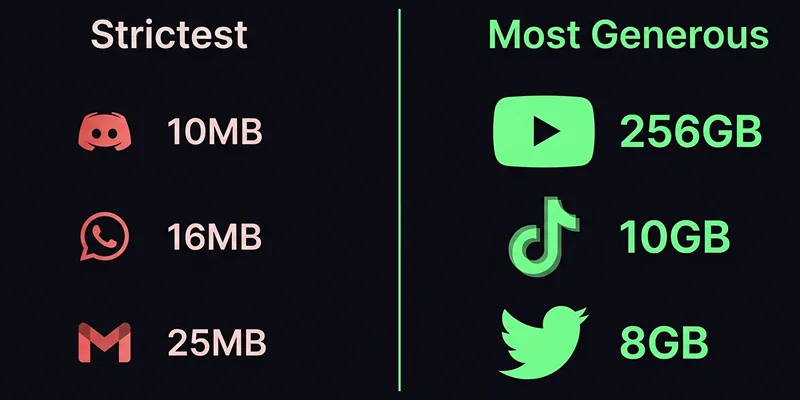
If we rank platforms by how restrictive their free-tier video limits are, the order is clear:
Most restrictive:
- Discord Free — 20 MB (10 MB until August 2026). One of the tightest caps on this list. Even a 20-second clip at 1080p often exceeds this.
- WhatsApp — 16 MB. Barely enough for a 20-second compressed clip. On top of the size cap, WhatsApp also re-compresses your video aggressively.
- Email (Gmail) — 25 MB. Tight but workable for short clips at lower resolutions.
Most generous:
- YouTube — 256 GB and up to 12 hours. Nothing else comes close.
- TikTok (web) — 10 GB with a 10-minute duration cap. Surprisingly large for a short-form platform.
- Twitter/X Premium+ — 8 GB and up to 4 hours. A dramatic improvement over the free tier.
How do I optimize one video for multiple platforms?
1. Export Once at High Quality, Then Compress Per Platform
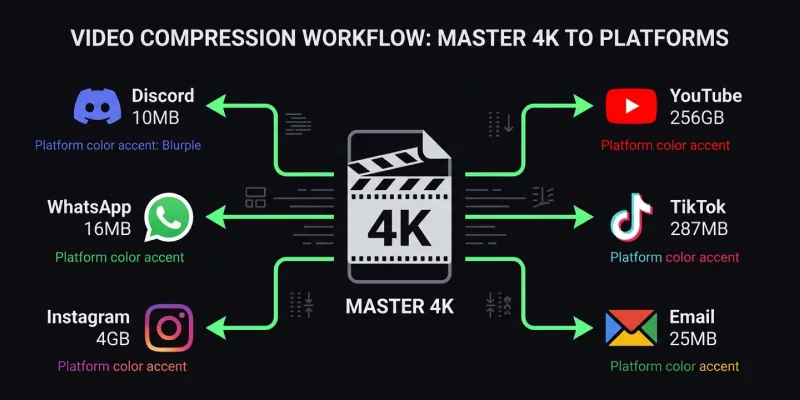
Export your master file at the highest reasonable quality — 1080p at 10,000+ kbps or 4K if your workflow supports it. Then create platform-specific compressed versions from that master. This preserves the most detail for each destination and avoids the quality loss that comes from compressing an already-compressed file.
2. Match the Aspect Ratio to the Platform
Resolution matters, but aspect ratio matters more. Instagram Reels and TikTok expect 9:16 vertical video. YouTube and LinkedIn favor 16:9 landscape. Uploading the wrong ratio means the platform will either pillarbox (add black bars) or crop your footage. Neither looks good. Prepare separate crops if you are posting the same content across vertical and horizontal platforms.
3. Prioritize Bitrate Over Resolution
When you need to reduce file size, lower the bitrate before dropping the resolution. A 1080p video at 2,500 kbps looks better than a 720p video at 2,500 kbps in most cases because more pixels at a modest bitrate still carry more detail than fewer pixels at the same bitrate. Only drop to 720p when the file size limit is extremely tight, like Discord Free or WhatsApp.
4. Use Modern Codecs When Supported
H.264 remains the safest choice for universal compatibility, but H.265 (HEVC) and AV1 produce equivalent quality at 30 to 50 percent smaller file sizes. If the platform and your audience's devices support newer codecs, take advantage of the compression gains. YouTube, for example, processes AV1 uploads and delivers them in AV1 to supported browsers, which can mean noticeably better quality at the same file size.
5. Trim Aggressively
Duration directly affects file size. Every second you cut saves data. Before compressing, review your clip and trim any unnecessary intro, outro, or dead time. A tightly edited 30-second clip will always look better after compression than a loosely edited 90-second clip squeezed into the same file size budget.
What is the fastest way to compress video for any platform?
VidCrush has 16 platform presets (Discord, WhatsApp, Telegram, Instagram, TikTok, YouTube, and 10 more) that auto-target each platform's exact size limit. That is exactly why VidCrush exists.
VidCrush is a free online video compressor that takes all of the guesswork out of the process. Instead of manually tweaking resolution, bitrate, codec, and frame rate settings, you simply select your target platform and VidCrush calculates the optimal compression settings automatically. It supports every platform in the table above: Discord (all tiers), Telegram, WhatsApp, Email, Instagram, TikTok, YouTube, Facebook, Twitter/X, and LinkedIn.
Here is how the workflow looks:
- Drop your video — VidCrush accepts MP4, MOV, AVI, MKV, WebM, and virtually any other video format.
- Choose your platform — select from built-in presets or set a custom target file size.
- Download the result — your compressed video is ready to upload, perfectly sized for the platform you chose.
Upload any video format, pick your target platform, and download a compressed MP4 in seconds. Files are processed on secure servers and auto-deleted within one hour. There is no account to create, no watermark on the output, and no limit on how many videos you can compress.
For creators who post across multiple platforms, VidCrush eliminates the tedious cycle of exporting, checking the file size, adjusting settings, and re-exporting. Compress once per platform, hit the right limit every time, and get back to creating.
Summary
Video upload limits in 2026: Instagram 4 GB (15 min Reels), TikTok 72–287 MB (10 min), YouTube 256 GB (12 hours), Facebook 10 GB (240 min), Twitter/X 512 MB–8 GB (2:20–60 min), LinkedIn 5 GB (10 min), Reddit 1 GB (15 min), Snapchat ~2.5 MB (60 sec). MP4 H.264 is the universal best format across all platforms.
Need to compress a video?
VidCrush compresses videos for any platform. Free, instant, no signup.
Compress Video Now